
The ASUS Republic of Gamers G53SX is the sequel to the G53SW and very little (if anything) has changed compared to the previous model except for the GPU, which has been upgraded from an Nvidia GTX 460M to its replacement the GTX 560M. Although “upgraded” is a relative term here, since ASUS has opted for the version with 2GB of GDDR5 and a 128-bit memory bus instead of the 1.5GB or 3GB version with a 192-bit memory bus. The smaller memory bus width almost certainly has an impact on performance, but on the other hand the GTX 560M has been given higher clock speeds that will even out the differences.
[pcu id=60]In terms of design, the G53SX is the 15.6-inch counterpart of the 17-inch G74SX, and the feature set is largely the same, but the 17-inch model’s GTX 560M has the full 192-bit memory bus. The G53SX is available in a number of different configurations, including the G53SX-A1, XR1, XN1, and quite possibly a few others, but most of them share the same Core i7-2630QM CPU and GTX 560M CPU. The only difference is the amount of RAM and hard drive capacity, so the difference in actual gaming performance between the different models will be practically negligible. For the record, our unit came with a 640GB hard drive and 8GB of RAM.
Design and Features
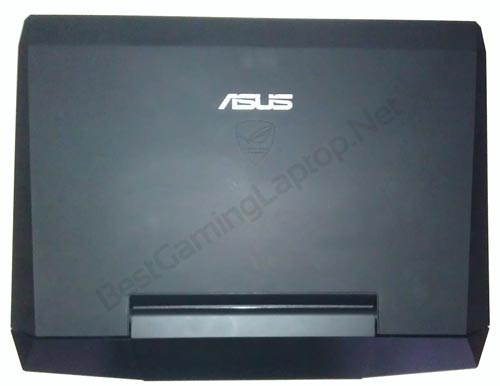
It has the same “Stealth Bomber” design as the other laptops in the series, in matte, rubberized black with two large rear exhausts – one for the CPU and one for the GPU. This is an excellent cooling solution that keeps both the temperature and noise level in check. The laptop stays fairly silent even under heavy load, which is more than you can say for most laptops. On the downside, the backside is a bit bulky and the laptop as a whole is quite large and heavy even for a 15-inch model (7.9 lbs).

Otherwise the design and build quality feels exceptionally robust. There are no loose parts or joints and the laptop is very comfortable to work with since it tapers off from the bulky back part with the fans to the much slimmer front with the rubbery palm rest and large, comfortable track pad. The latter supports multi-touch gestures and two-finger scrolling, which is great, but the buttons give off a rather loud clicking sound when depressed.

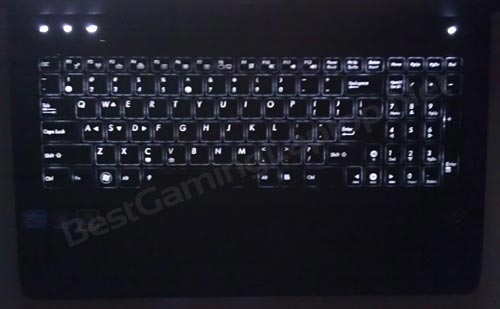
There is a small amount of flex in the illuminated keyboard, but not to a disturbing degree. Writing this review on the G53SX is quite a comfortable experience even though ASUS has crammed in a small numpad on the side – a somewhat questionable design choice in a 15-inch laptop, but it works on the ASUS, possibly because it’s slightly wider than the average 15-inch model. Speaking of which, a large bezel around the screen is an annoyance that hopefully disappears in a near future. This is not specific to ASUS, but a 16-inch or slightly larger panel would easily have fitted within the confines of this frame.
While we are on the topic of the display, the manufacturer has been kind enough to use a matte variant instead of the glossy screens that are commonplace in laptops with low-end TN panels. The panel is almost certainly a TN, but it is very bright and the colors and contrast are almost as good as those on my desktop VA monitor when viewing the screen from the front. Its viewing angles are decent, but colors get washed out from sharper angles.

The screen resolution is 1920 x 1080 (“Full HD”), which is a very high resolution on a 15.6-inch laptop. It is a good idea to right-click on the screen and select “screen resolution” and then click on the blue link that says “make text and other items larger or smaller” and go with one of the larger options. Games look fantastic in Full HD though.
In terms of connectivity, the G53SX comes with Bluetooth and one USB 3.0 port (along with three additional USB 2.0 ports), HDMI, VGA, Gigabit LAN and headphone/mic jacks. Naturally, wireless N is also supported.
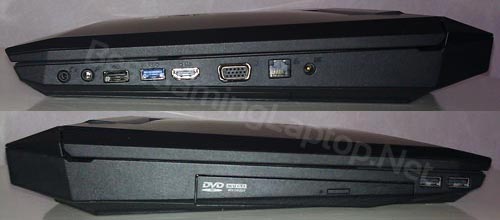
The G53SX actually has two hard drive bays just like its larger 17-inch counterpart, but it is mainly sold in single-drive configurations. You can of course insert drive number 2 yourself if you have a small screwdriver and some time to spare – the second SATA port is enabled and runs at SATA 3.0 (6GBps) speeds, so you can boot from an ultra-fast SSD and use the hard drive for secondary storage.
Performance – Synthetic
Now to find out how the 128-bit GTX 560M performs in the real world and have look at overall performance. As usual, the first and foremost way to get some good comparison numbers is to run Futuremark’s 3DMark and PCMark benchmarks.
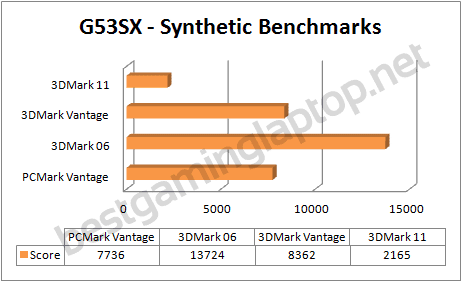
These numbers are interesting. As expected, the smaller memory bus has some effect on 3D performance, but primarily in 3DMark06 (DirectX 9). The 3DMark Vantage (DX10) score, 8362, is also below average for a GTX 560M, while the 3DMark 11 (DX11) result, P2165, is actually markedly better than any GTX 560M review score that we’ve been able to locate. The only thing we can think of is that the latest NVIDIA drivers have been tweaked for 3DMark 11. The lower average scores notwithstanding, the 128-bit 560M is still a capable GPU and noticeably faster than the GT 555M for example. On a side note, it is possible to take the 3DMark Vantage score above 10,000 points with some overclocking, but that’s a story for another time.
Gaming Performance
Just like we did last time with the Alienware M14x review, we’re focusing on the optimal settings that provide playable frame rates at the best possible quality settings, i.e., around 30 frames per second (FPS) or better. It’s safe to say that the G53SX and its GTX 560M can play any game currently available at good quality settings at the very least. The main question is whether it can run them at the display’s native Full HD resolution without sacrificing too much on the visuals. The short answer is that among the games we’ve tested, DX11 Crysis 2 stands out as on of the two games where we had to tune down the screen resolution to get reasonable frame rates, which is hardly surprising considering that not even two GTX 580M’s in SLI can handle Crysis 2 in DirectX 11 with high-res textures. Running it in DX9 on the “very high” (actually medium) setting in 1080p native resolution is nevertheless a gratifying experience. The other game was the infamous GPU-killing Metro 2033, which wouldn’t run at playable frame rates in DX11 mode at all, but the “normal” or medium setting and DX10 was fine and produced a convenient 30 FPS.
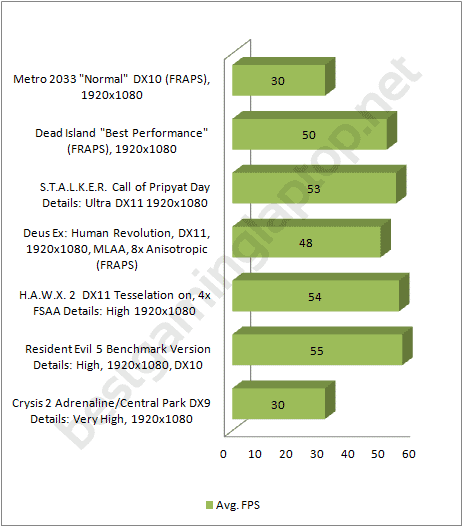
FRAPS is a great tool, but benchmarks produced with it are not as accurate as standardized tests; Since you basically have to pick a scene or level and go with it the results are somewhat arbitrary, but still give you a fairly good reading of what to expect from different games. All frame rates in the chart have of course been measured with the GTX 560M’s stock clock speeds. Aside from Metro 2033 and Crysis 2, there was no reason to overclock anyway to run the remaining five games at high settings.
Resident Evil 5, HAWX 2 and STALKER posed no challenge at all to the G53SX–producing 50+ frames per second at high-detail settings. Even the brand new Dead Island produced a 50 FPS average at the display’s native 1920×1080 resolution with all the details maxed out. Another positive surprise was Deus Ex: Human Revolution, where we could tweak the already relatively high settings and add improved texture filtering as well as some other tweaks from the “advanced” graphics menu without any relevant loss in FPS.
By and large, it doesn’t look like the 128-bit GTX 560M is all that “crippled” after all, although exchanging half a GB of video RAM for the wider memory bus would probably have been preferable. 2GB or more video memory is still overkill for most if not all laptop graphics cards.
Temperature and Noise
This is one of the best parts–even when gaming or running benchmarks that forces the system to work at its full potential, the G53SX remains comparatively silent. The double-barrel cooling solution on this laptop is possibly the best one on the market. Where a single fan would have to work twice as hard and twice as loud, the twin exhausts on this “Stealth Bomber” keeps it at acceptable temperatures at all times, whilst keeping the noise level to a minimum. Sure, the fans (particularly the GPU fan) go into a louder mode from time to time, but never reach a disturbing level.
Battery Life
Even though it should theoretically be able to support it, ASUS passed on NVIDIA’s Optimus technology, which automatically switches between the high-end GPU and Intel’s power-saving but otherwise largely useless IGP. Therefore it will have to run with the GTX 560M at all times, and even though the GPU clocks go down to the bare minimum when the laptop is in power-saver mode, it sill won’t be able to compete with gaming laptop that come with Optimus or AMD’s switchable graphics.
The result is a battery life of about 3 hours with Wi-Fi on, medium brightness and the battery-saving power plan in effect (i.e. useful settings). This is still a fairly decent result for a laptop running only a high-end graphics card and it also saves you the hassle of having to wait for graphics driver updates from the manufacturer, which have a tendency to never show up. Depending on how important this is for you, it may still be a drawback seeing as there are now gaming laptops that can actually last for quite a few hours on battery power. On the other hand, playing games on battery power will use up all the battery juice in roughly half an hour in any decent gaming laptop, Optimus or no Optimus.
Final Thoughts – Pros and Cons
One aspect that we haven’t mentioned yet is the price tag, and the G53SX offers extremely good value for money–the entry-level configurations (which are still equipped with a quad-core CPU, 8GB of RAM and the same GTX 560M) sell for less than $1,100 from some retailers. That’s the lowest price we’ve seen on a laptop with the GTX 560M. As for the drawbacks, we have already covered most of them, the 128-bit memory bus in the GPU being our main complaint. It is also surprising that the G53SW nearly always ships with a single hard drive although it’s equipped with two full-featured SATA III 6Gbps hard drive bays (no need to replace the optical drive either). Although there’s no RAID 0 support, using an SSD as the primary drive sounds like a great idea.
We have no complaints about the build quality in general, which is rock solid if a bit on the heavy side. A backlit keyboard is also nice to have even if you can’t customize this one in all the colors of the rainbow like the Alienware ones. The crowning achievement though, is the superb cooling solution. The “Strike in Silence” slogan used by ASUS for its Republic of Gamers lineup is definitely not without merit.
[pcu id=60]



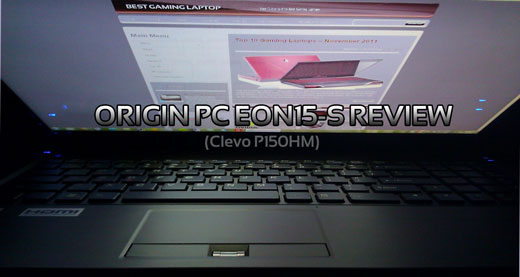
Thanks Poynsid! The screen on this one has a matte finish, while the one on the Eon I tested was glossy. Not much difference quality-wise, but glossy is a bit more “vibrant” (subjective). The downside is of course that it’s glossy… I think Origin lets you choose either when you customize the system though.
Between this laptop and the Eons (Origin) which one has a better screen. (Great review by the way, very useful)
I was thinking of getting a new laptop. Should I get this or the MSI GT683DXR? I’ve heard that the GT683DXR have an awful keyboard, So yet, it has a GTX570M… Recommendations?
You can always upgrade RAM (to 16GB) and the hard drives (there’s room for two). It’s hard to say what will be good in a year or two, but Intel seems to be moving forward at snail’s pace right now what with the lack of competition from AMD. The new 28nm GPUs may be a bigger threat to longevity.
So what kind of upgrade possibilities do you have with the G53SX? future wise, will it still be good in a year or two, spec wise?
Sadly no, the 560M in the G53SX is not a standard MXM card. 😐 Even if it were, the power brick would probably not be able to handle the GTX 580M (the ones for laptops with the 580M are HUGE).
So my computer is dead, beyond repair so I’m probabely gonna pick a new one 😛 which one of these are best, also keep in mind that I want to play BF3 on it:
http://www.netonnet.no/art/data/gaming/datamaskiner/asus-g53sx-s1216v/162112.5652/
or
http://www.netonnet.no/art/data/gaming/datamaskiner/msi-gt780dx-430ne/162498.5652/
Yeah which reminds me, is it possible to put in a GTX580 into the G53SX?
realy thinking about buying this gaming notebook, or maybe i will wait for new G55 series, but i would like to know, if i can have in G53SX models 2 hard drives?? you wrote something about that in final thoughts, but with G53SW model. are SX different from SW in ability to place 2nd HDD?? in our country it seems there are only SX models left..
By then the new G53 will be released 😛
Argh… and I still gotta wait two weeks for NettOnNett to fix my computer <.<
How did you know? 🙂 But thanks a lot, and same to you! This page is not particularly swedish at all (subject is probably far too narrow). Availability and just about everything else concerning gaming laptops is way better in the US, so that’s where I gear up whenever the opportunity arises. (amazingly, high-end laptops are apparently even cheaper in the US than in China!)
Well, then you’re certanly an american!….. just kidding 😛
You do amazing work though. I think i’m gonna start checking onto this page more often!
is this a swedish page, or international?
True, 30 seconds of single-player is not the most thorough test in the world, but it would be impossible to get comparable results in multiplayer mode.
Those specs look almost identical to the one on this page. There’s no question that the G53SX can play BF3, but perhaps the medium setting needs to be tweaked a bit with custom settings to get 30-ish FPS in the more intense multi-player fights.
You guess correctly and good review BTW! (I’m not Danish and not Norwegian but from behind door number three) 🙂
hmm… now I wonder how it would perform online. since, those 30 seconds can’t be compared with a tank exploding in your face while the choper above sprays bullets all over the place. I’m just afraid that if I buy it, it will drop too much.
I’ve played BF3’s singleplayer , though on a XBOX. I now want it for the computer, since… I have to admit, the computer is the ultimate gaming console. much better performance and so on, but you have the risk of a game running slow. Which you don’t have on console.
Poorer graphics, but at he same time, usually, stable gameplay.
So as a recomendation from you, since you’ve tested it. Should I buy BF3 for the ASUS G53SX?
I’ve exactly got this version:
http://www.icecat.biz/p/asus/g53sx-sz061v/g53-series-notebooks-g53sx-sz061v-9476976.html
I just like to double and triple check before I do something 😛 If you say that it will run on medium, all the way, with 30 fps (ish), then I’ll buy it. When I get my computer back…
I wrote my own review of BF3, though on the xbox,and the review is in Norwegian. But since you posted a link in Danish, I’d guess you’d be able to read it?
http://www.microsoftalpha.no/spill/battlefield3/
Wow, you actually wrote an article about it! 😀
I’m seriously impressed! Now I just gotta read it.
I hope you show up again Flaskekork, because I gave it a try 🙂 Here it is: https://www.gaminglaptopreport.com/articles-guides/battlefield-3-laptop-system-requirements-check/
Medium is indeed the new maximum for BF3, but IMO the game looks great no matter the setting, as long as it runs at native resolution.
Well if you find time to check it out, I’ll continue to show up here now and then so that if you post an update I’ll see it.
Medium sounds good to me though. Cause BF3 is some heavy shit 😛
I just thought that cause the G53SX can run Crysis 2 on very high and still av 30fps, I just thought that maybe it would be the same thing for BF3.
That’s some bad luck, Flaskekork, hope you get it fixed soon! But better right now than 5 minutes after the warranty expires 🙂 I actually still have the G53SX around, so I guess I should try BF3 on it. It only just works at the ultra preset with the GTX 580M, so I’m guessing medium settings with the 560M (still looks fantastic, though). Could the frame skipping be due to the fried MB? The GPU is soldered on the MB in the G53SX…
hmm… thanks allot!
I bought the G53SX-SZ061V, which has i7 and 8GB ram. It handled Napolen Total War on full, with ease. And yes, the cooling is amazing!
Problems being:
BIOS wasn’t up to date so the backlit keyboard did NOT work. ATK Package update didn’t work either.
So went to a computer store, where I know the people so he upgraded it for free. he took the right file and everything. Problem being: The MB got fried somehow…. so now I’m waiting, HOPING to get it back soon.
I’m considering to buy Battlefield 3, do you know how the G53SX would handle it? before I do something stupid and have a horrible FPS 😛
In addition: I experienced some odd lag, where it skipped frames. not like FPS-drop, but it skipped frames. Noticed it in several games. Interactive objects that were moving suddenly jumped some feet ahead.
Hei Flaskekork, good question. It likely varies from game to game, but by and large an i5 will probably not be a bottleneck for the GPU. I found this review of the i5 version http://www.laptopworld.dk/anmeldelser/Baerbare/4286-asus-g53sx.html. The 3DMark scores are a bit lower, but not dramatically so and the CPU is also weighed in those scores.
I’m planning to the G53SX, but everywhere I look I see it with the i5 processor.
Gonna play:
Total war series
World of Tanks
R.U.S.E
Civilzation V
should I look harder to find one with i7 or will the i5 just do fine?
Hi I wonder,what settings will BF3 run on on this laptop?
Berg, Thanks for the reply. I’m referring to the GPU temperature. Mostly it idles around ~40-45, actually. I’ve read online that the highest that the GTX 560m can go is 99C. I’m just trying to play it on the safe side.
Hi Max and welcome back! Is that the GPU or CPU core temperature? Either way, temperatures up to 80C are perfectly normal for a high-end laptop under load (the GPU can usually go a bit higher). If it idles at around 50C and goes to 79C only under load I would give it a clean bill of health. There’s a theoretical upper limit at 100C, but that one should definitely be kept theoretical 🙂 The biggest risks of exceeding healthy temps (and no doubt the most common) are probably putting it on a cushion/padded armrest or using it in bed without a laptop cooler. Anything that blocks the ventilation holes is a bad idea.
Berg, I recently picked up a g53sx after reading your review, and I’m loving it. Although, the only thing I must inquire about is the cooling system on the machine. After installing a Windows 7 Temperature gadget, it reads that the GTX 560m is running at ~74-79 degrees Celsius under load. Is this normal for this gaming laptop? Should I be worried about it getting too hot? What types of precautions should I take? I can’t find too much help after scouring the web.
On a side note, this is great review! This laptop can’t be beat in terms of bang for the buck.
@Eypok: Thanks! When it’s not an “even” pair of RAM sticks it will run in something called asynchronous dual channel mode, so it is definitely not a big loss! In fact I wouldn’t worry about it at all. There should be a very small performance difference, but hardly a noticeable one.
James93: In this case, yes. The 2GB 560M has higher clocks, but a smaller memory bus (128-bit vs. 192-bit). Most MMO’s are not too demanding, so I think it’s safe to say that most if not all will run at high settings with good frame rates.
So is Nvidia GTX 460M just as good as NVIDIA GeForce GTX 560M? I ask because I am strongly considering this laptop. http://www.amazon.com/G53SW-XA1-Republic-Gamers-15-6-Inch-Gaming/dp/tech-data/B004X5XL3Q/ref=de_a_smtd
Will the 460m play games such as Star wars: the old republic and other mmo’s at high settings and good fps still? Because that is what i will mainly be playing on it.
Thank you very much for your great review ! It’s been 2-3 days that I’m reading reviews about Asus G53/AW M14X, and I just decided to go for the Asus G53SX-S1177V. But this one has 2+4Gb memory, which doesn’t benefit the dual channel feat right ? Is it a “big” loss and shall I go for 3+3 or it doesn’t really matter ?
Thanks 🙂
I couldn’t find the exact specs for that build but I’m fairly certain that it’s the 1GB version. Personally I wouldn’t be too concerned if it’s not 2GB though, I just posted a small rant about excess video RAM here: https://www.gaminglaptopreport.com/news/how-much-video-ram-do-i-need/ 🙂
Berg,pls enlighten me on this….how much total video memory does the Radeon HD 6770M have in the HP DV7 6143cl and how much is its dedicated video memory?
Thank u berg.
Hey Sara A,
Yes, it looks like it’s sold out in a lot of places. This is probably partly because of the holidays but it is also being silently replaced with the new DH71 and TH71 models you mention, which have new and slightly faster Intel processors. Otherwise it is highly unlikely that it’s being discontinued anytime soon before Intel’s next generation CPUs and NVIDIA/AMD’s high-end 28nm graphics cards are on the market (not confirmed but possibly around spring/summer).
@Aspyro: The dv6-6170 is the pre-built model with an i7 2620QM and a HD 6770M GPU? In that case it will play all current games at more than decent quality settings. It will only run into trouble when you turn on DX11 features like tessellation in new games like Crysis 2, but it should run just fine in DX9 mode.
Pls berg,is the hp dv6 6170 good for gaming? If yes what current games can it play?
Hey Berg,
A lot of the models such as XN1, XR1, XT1 are now showing as sold out and discontinued at a lot of places. The only two that seem to be available is the DH71 and TH71. The difference between the two being the ram and hdd. Is the G53 line being discontinued? Should I go ahead buy or wait for a newer 15.6″ ASUS laptop?
I honestly have no idea how global warranties work. I’ve never had to use one. I suppose the worst case scenario is that you have to ship it back to the original seller for replacement.
And yes, there was talk about a glasses-free 3D G53SX and ASUS demoed one, but I haven’t seen it since.
Oo and what about that 3D naked eye buzz?
Tnx Berg. Nice job. One more question to ask u.
Im from Croatia btw.and i ve got a bro in states who bought me xt1 and he is gona bring it to me in a few days.so what am i gonna do when the laptop crashes or has a bad mailfunction? Can i repair it in croatia? What about the guarantee?
[…] Qosmio gaming laptops include an NVIDIA GTX 560M graphics card–the same model as in the ASUS G53SX that we recently reviewed but with 1.5GB of video RAM and a wider memory bus. The short version is […]
@Hydrographer,
Sounds bad if the M11x is so fragile. I got a pretty robust impression from the M14x. Maybe an R1 problem? Early adopters always get to be Guinea pigs + pay for the privilege… At any rate, moving to a quad-core i7 machine and GTX 560M (128-bit or not) from the low-voltage Core 2 Duo should be a night and day experience.
@Marin: Looks that way: http://www.tigerdirect.com/applications/SearchTools/item-details.asp?EdpNo=637425&CatId=4938
Hi guys, can anyone tell me does xt1 comes with blueray???
Great thanks Berg.
Was a little concerned about the memory bus reduction on the GPU compaired to the 1.5 and 3 gig versions but the other improvements are a reasonable trade off for me and I didnt want to move up to a larger 17″ lapotop. i had the Alienware M11x in its first incarnation but just out of waranty the screen has all but fallen off and it now only has about 15 mins batter lifeeven with discrete graphics running. Wont be buying a Dell again. i have high hopes for the ASUS however.
Hi Hydrographer,
I had to look it up because the DH71 seems to be a new version. But the reason the version numbers are hard to tell apart is that they are mostly similar. The things that differ are mostly the amount of RAM and storage space. But the DH71 also seems to come standard with the newer Core i7 2670QM, which is 10% faster than the 2620QM in this model. It also comes with a bigger drive and more RAM, so it has several improvements over this model. The GPU is apparently the same though (2GB GTX 560M).
Hi Berg,
I am awaiting delivery of the DH71 model of this laptop. But looking at the specs im struggling to see the diferences between this and the other versions of the same laptop. Could you please enlighten me?
Thanks.
Thanks Eric! Well, it’s true that the 128-bit bus and more RAM wasn’t the best choice Asus ever made, but what that guy says is ridiculous. An overclock like that gives it a 10,000+ 3DMark vantage score, which is well above what a stock GTX 460M delivers: https://www.gaminglaptopreport.com/general/gtx-560m-overclocking-128-bit-version/
And like you said this laptop is just an amazing amount of performance for the money right now.
Thank you very much for the awesome review. the 128 bit gpu worried me a lot, but after reading your review, I feel that this laptop was well worth the $810 I paid for it (Asus g53sx-xt1). This is what one guy claims, “To achieve the same performance of a stock gtx460m, youll need at least an overclock in the likes of 900mhz/1600 on the gimped gtx560m.”
Thanks Devinishhome. The layout of the different G53SX models are identical as far as I know, only the specs differ slightly (except for the GPU). The older G53SW is also identical in terms of design but with a GTX 460M instead (not much difference due to the memory bus issue). At any rate the XT1 (with Blu-ray?) for $900 is a lot of hardware for the money!
I just ordered the XT1 a few days ago. I found your review the most helpful as well as you have the pictures of the things I wanted to see. This laptop looks like it will do what I want and a little bit more considering the $900 price.
[…] middle of the page to find a couple of very attractive offers. One is for a brand new ASUS G53SX (read our review here) for just $899.99 including a Blu-ray drive! Even more importantly, this laptop comes with a […]