
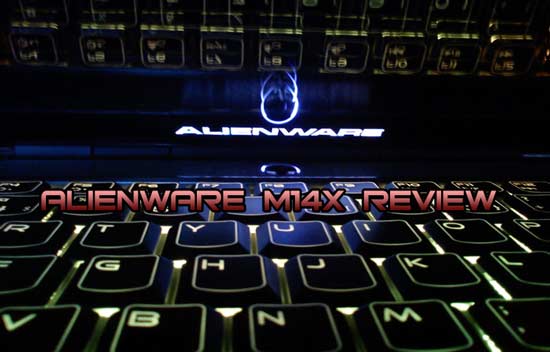
An alienesque package containing a “stealth black” Alienware M14x has just arrived. The white lab coats are on and to be a little original we are going to test it with both the included hard drive–in this case a 500GB 7200rpm drive as well as a 256GB Crucial m4.
But first things first; this is a full review so let’s go over the basics first. Here are the specifications for our system:
- CPU: Quad Core Intel Core i7 2630QM 2.0GHz (with TurboBoost 2.9GHz)
- Graphics Card: Nvidia GeForce GT 555M with 1.5GB of DDR3 + Intel HD Graphics (Nvidia Optimus)
- Display: 14-inch WLED (1600×900)
- Memory: 8GB of 1600MHz DDR3 (Hynix)
- Hard Drive: 500GB 7200rpm (Seagate Momentus, stock HDD)
- (SSD: 256GB Crucial m4)
- OS: 64-bit Windows 7 Home Premium
- Dimensions: 1.49″ x 10.7″ x 13.27″ – 6.45lbs / 2.92 kg
Current coupon for $50 off from Dell: BHW1L0MX0D?MCX

Design and Build Quality

The M14x’ chassis feels extremely robust and a lot of thought has obviously gone into this build. This is apparent not least when you start to dismantle the laptop. Only two screws keep you from accessing the internal parts, and the screws are fastened on the other side with a small brick so you can’t lose them. The lid and palm rest areas are covered in a smooth, rubber-like material that does not attract fingerprints or smudges as easily as glossy surfaces.
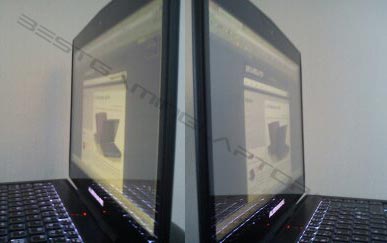
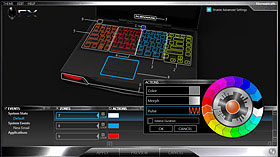 The WLED panel is very bright and sharp. Compared subjectively to some other panels we have on hand, a 2010 MacBook Pro 13, a Gateway netbook and a regular desktop monitor with a TN panel, the one in the M14x is the most attractive by far. The viewing angles are also surprisingly good for a TN panel. Like all other Alienware laptops, the M14x comes with “AlienFX” backlighting for the keyboard, track pad and other components, which is really fun to play around with. It lets you change the backlight color of individual components as well as certain zones of the keyboard. You can set it to anything from a conservative, slightly dimmed white to a flashing neon rainbow Las Vegas-style. Everything is customizable via the included AlienFX tool.
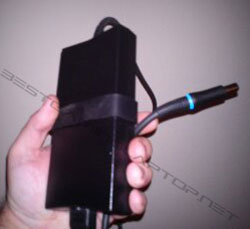 On the whole, you definitely get the impression that this is a premium quality laptop. At the same time it is also heavy for a 14-inch laptop. It actually weighs more than the 15-inch MacBook Pro (and its Windows competitor the new lightweight Dell XPS 15z). We expected it to be somewhat clumsy, but that’s not really the case. It is just very compact. On the other hand some added weight shouldn’t be surprising when you’re dealing with the most powerful 14-inch gaming laptop in the world, which is the slogan–quite an accurate one by the way (of course, there aren’t many 14-inch gaming laptops on the market, but still). The 150W power brick is fairly large as expected but also flat, so making room for it in an average 15-inch laptop bag shouldn’t be a problem. It also has that convenient rubber strap attached that Dell is known for. Even the laptop end of the power cord lights up when it’s connected to the mains.
In terms of connectivity, the M14x includes two USB 3.0 “SuperSpeed” ports, one USB 2.0, dual headphone jacks + 1 mic, HDMI, Mini DisplayPort, VGA, multi-card reader, SIM-card reader, Ethernet port and an optional WirelessHD output that streams HD audio/video to an external HDTV or projector (not present in our unit). It’s also equipped with a slot-loading DVD reader/writer, which is a questionable design choice. A Blu-ray player might have been justified, but most of us would get by without the optical drive or use an external one. For those who like to experiment, however, it is apparently possible to replace it with a hard drive dock similar to the OptiBay solution for MacBooks.
Performance
The Alienware M14x is indeed very powerful for a 14-inch laptop. This particular model includes a quad-core, 2nd-generation Intel Core i7 CPU that runs at 2.0GHz but automatically overclocks to 2.9GHz on demand. This is the “slowest” processor available for the M14x. [Correction: after this review was published, Dell started offering a cheaper dual-core Core i5 alternative]. Other than the 2.0GHz CPU in this model, you can also upgrade to an i7 2720QM running at 2.2GHz (3.3GHz with Turbo Boost) or an i7 2820QM running at 2.3GHz (3.4GHz with Turbo Boost).
Any of the above CPUs will give your laptop performance aplenty. There’s also an option for an Nvidia GeForce GT 555M with 3GB of video RAM instead of 1.5GB–an upgrade that we can’t imagine has any noticeable effect on games. A better option would have been a GT 555M with GDDR5 memory modules, but this alternative is unfortunately not offered by Nvidia, so it’s no fault of Dell’s. This is possibly to differentiate the GT555M from the high-end GTX series graphics cards, which this GPU is already very close to in the performance department.
What about the battery life? In spite of Optimus it doesn’t last that long unplugged. On the ‘Balanced’ power setting (default) and while actively using the laptop–web browsing, background processes running and so on–it lasts for about 2 hours and 30 minutes. With aggressive power savings it should be able to run for 4-5 hours, but the 6-hour mark would be very tough to reach. This is not surprising considering the powerful components inside. It was not until switchable graphics came along that you could mention ‘battery life’ and ‘gaming laptop’ in the same sentence, so it’s good to see that things are improving on this front.
Synthetic Benchmarks
The largely useless Windows Experience Index pegs this laptop at the lowest base score 5.8, for the Windows Aero interface (because it uses the integrated GPU). For gaming graphics the score is 6.9 (without overclocking). The other scores are 7.4 for the processor, 7.6 for the memory, and finally 5.9 for the hard drive (apparently the maximum score for all hard drives) or 7.8 for the SSD. In PCMark Vantage, the score with the original 500GB hard drive was 7,436 and with the SSD 9,307–a noteworthy difference which is only attributable to the HDD score. Similarly the system boots considerably faster with an SSD: 27 seconds to a fully working desktop compared to 1 minute and 5 seconds with the hard drive. The other Futuremark benchmarks are all about graphics performance–arguably the most important factor for this system. 3DMark 06 measures DX9 performance, 3DMark Vantage DX10 and 3DMark 11 DX11, respectively. All of them were run with stock clock speeds and delivered excellent results. Note that the 3DMark suite has been run on an external monitor to comply with the default resolution (1280 x 1024).
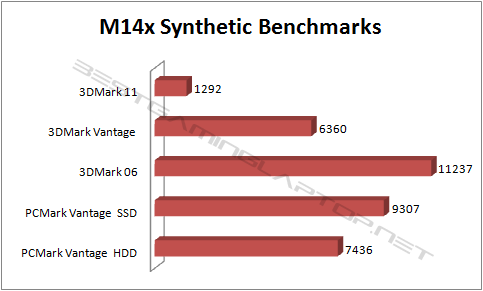
Important update: After using the M14x in combination with the m4 SSD for a while, it became apparent that this drive does not run at SATA III 6GBps speeds for some reason–something that almost certainly affects the PCMark Vantage HDD score. Moreover, it must have the Intel RST (Rapid Storage Technology) driver installed for this SSD to function properly. This is installed by default and carried over when we cloned the hard drive contents to the m4; however, using the system without the driver causes instability. Whatever the root cause of this problem, we can not recommend a combination of an M14x and a Crucial m4 SSD for the time being.
Gaming
Now for the interesting part, namely how the Alienware M14x performs in different games. We have intentionally chosen to run the games at native resolution (1600×900). This makes the frame rates more difficult to compare against other laptops (that’s what the above benchmarks are for), but it gives you a much better impression of what the M14x is actually capable of. It is always preferable to run your games at native resolution, as it always gives you the best image quality. In other words, this might be one (and probably the only) reason to opt for an M14x with a 1366×768 panel, which is also available. It’s fairly safe to say that the M14x will run any game currently on the market in native resolution at more than adequate frame rates.
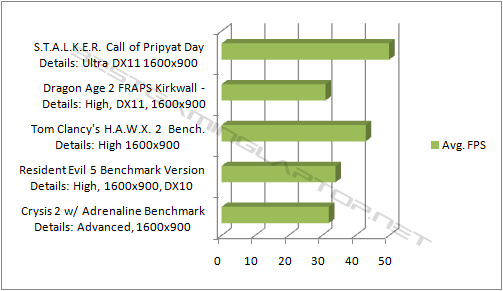
As you have probably guessed, our sights were set on the 30 FPS (frames per second) mark–the point where everything is silky smooth with the only limiting factor being your eyes, which can’t perceive higher frame rates. In STALKER and HAWX 2, the mark was impossible to miss even on the highest settings (without FSAA). Dragon Age 2 was fully playable in the “high” setting using DX11 as the renderer. Crysis 2 was running smoothly at the “very high/advanced” setting (actually the game’s medium setting), whereas Resident Evil 5 was another game where everything could be left on high. All games were run without any overclocking or other tweaks, with the usual services running in the background. All of the five games were in other words playable at the display’s native resolution; the older games with all the details maxed out, and the new ones with less details but without having to lower the pixel count. Here’s a higher quality video captured with FRAPS. Keep in mind that there’s some performance loss when recording this way, but it never drops below 30FPS.
Heat and Noise
The M14x ranges for completely silent to Xbox 360 blow dryer mode. When you are just browsing the web an writing an Alienware M14x review in Word for example, the laptop is actually entirely passive and silent. The fans only start up occasionally to blow out some moderately hot air. When firing up Crysis 2, on the other hand, the fans become very active and loud. At the same time the cooling solution appears to be very efficient; the laptop never gets too hot for its own good. Also, when playing games you are probably wearing a headset or making use of the included Klipsch speakers, which give off a fair amount of above-average sound by the way. It actually has some bass and depth, which is more than you can say for just about any other laptop.
Conclusion
We can only agree that the Alienware M14x is the most powerful 14-inch gaming laptop in the world, although this comes at the cost of it being a pound heavier than the average 14-inch machine. The quad-core Sandy Bridge Intel CPU, which shows up as eight cores in the operating system thanks to Intel’s Hyperthreading feature, makes everything extremely snappy and responsive, although ours is the slowest alternative. With an SSD the loading times are theoretically 4-5 times faster, and subjectively the system feels about twice as fast in everything but the games. The games’ loading times are greatly improved though. Nvidia’s GeForce GT 555M is not quite on par with the latest GPUs from the GTX series, but comes very close. If you are looking for a gaming laptop in a more convenient form factor than desktop replacement, the M14x is definitely the most capable option at the moment.
[pcu id=40]Current coupon for $50 off from Dell: BHW1L0MX0D?MCX



Are there any problems with viruses on this computer?
Thanks Sky! Yes, it’s true that you can find a laptop with equivalent specs for less than the M14x, but the vast majority will be 15.6″ and not 14″, so it depends on whether size is important I guess.
Hey Berg! Great review! I love the alienware design and all the features but other reviews say i could get a much better labtop with almost the same price, is the M14x value for money? THX
Thanks Kelvin! The M14x lacks an MXM expansion slot, so it’s unfortunately not possible to swap the graphics card for something faster. Even if it was though, the M14x is a bit too small to cope with the higher temps from a GTX 560/570M. On the other hand the resolution is also lower than the G53SX or 683DXR, so it doesn’t require as much performance to run the games at native resolution.
Great review! I have been in the market for a gaming laptop for quite sometime and have set sights on the m14x. The only thing that worries me is the graphics card being not as good compared to the Asus G53sx or the MSI 683DXR. Hmmm, was wondering if I could change up the grpahics card on my own to something better like the GTX 570M? Would that be possible? Would appreciate your advice! Thanks!
Hi Aman, thanks for reading! When I was your age I had an Intel 486 with a dedicated turbo button that would overclock it to an amazing 100MHz 🙂 How’s that for an old-timer comment… Anyway, I hope you find a great gaming laptop! Fan noise is unfortunately more or less inevitable, particularly in the smaller machines. The G53SX makes less noise but it’s also larger and heavier if that is an important factor for you. There’s also the MSI GT683DXR, which comes with the faster GTX 570M GPU. I haven’t tested this one myself but we have a review on the way from a reader that will be very interesting to read. Also, if you can cope with waiting a few months (I know it’s hard), there are some new Intel CPUs as well as next-gen 28nm graphics on the way next year (not the current Nvidia 600M series and AMD 7000M series, though, which are just relabeled old models).
Thanks a lot for the review Berg!!! I have been looking forward to buy the m14x and have done quite a bit of research myself. I am 14 years old and had started to play the latest games a year back, so this will be my first gaming laptop purchase. One thing that concerns me is the fan noise. Anyways could you recommend to me other gaming laptops of under 15″ and under 1750 usd(asus g53sx is one). I plan to play games like crysis 2,battlefield 3 etc. And also I want to make sure that such an expensive investment can last atleast upto 3 to 4 years. Thanks a lot!!!
[…] laptop and includes free shipping. That means that the latest M11x starts at just $799, the M14x (review here) at $999, M17x at $1,399 (3D version also eligible) and M18x at […]
Holy *** Simon, you’re right! I forgot to add it to the specs. For what it’s worth it weighs 6.45lbs/2.97kg without the power brick, so it’s not disastrously heavy by any means, but heavier than the average 14-incher by about a pound/half a kilo. Of course, it’s also a lot more powerful than the average 14″ laptop.
You talk about how much heavier it is but don’t say how much it weighs!
Hey! thanks for the quick reply , since u mentioned the g53sx , you would still prefer the m14x?
Thanks MGhallo! The first thing that comes to mind is that the M14x and G73 are really two very different size categories. There’s also a 15-inch version with more or less the same specs (https://www.gaminglaptopreport.com/reviews/asus-g53sx-review/)
The G-series have the faster GTX 560M GPU, but this is somewhat compensated by the M14x not having a Full HD screen. There’s no question that any of these laptop will play BF3 and Diablo 3 at decent quality settings, so it essentially boils down to the size factor. If you will be traveling a lot, a G73/G74 is quite a bit of weight and bulk to lug around. My personal preference would be the M14x for its good portability/performance compromise, but I’m sure some hardcore ASUS fans would beg to differ. 🙂 All in all, they are both good, solid laptops but I would hesitate to travel with such a large desktop replacement as the G73.
Nice Review Berg! I need your opinion since i am going to study abroad i need a good laptop which will be accompanying me for 3 years. It is needed for gaming(Battlefield3,Diablo3) and also able to handle loads of project works throughout. i came down to 2 laptops which are the Alienware M14x and Asus G73. i would get the M17x but its out of my budget. Please help me evaluate which would be the best laptop that i should choose! Thanks Berg!
Hah yea I’ve wasted so many hours playing Heroes 3 as well, greatest one out of all of them. Thanks for the reply, I agree that the 15z is sweet, it’s a shame to learn that it cannot handle games as well. Now it’s time to find an M14x in a store so I can try it out beforehand. Thanks again and keep up the solid work.
Thanks JB! I’m also a huge HoMM fan (really don’t want to know how many hours I’ve spent with it since Heroes 3). At any rate, it (and Starcraft 2) should run nicely on the M14x. Keep in mind that it’s heavier and slightly thicker than the E6400, but still very portable for a gaming machine. The XPS 15 and 15z are not as well equipped for games unfortunately, with a GT 540M/525M with 96 shaders instead of 144 in the M14x. That’s too bad because the 15z is one nice-looking laptop.
Nice review! Very much appreciated since alot of people talk down on alienware.
I’m in the market for a new laptop and want to get one that is good overall, but also can handle games well. I’m not a big gamer, the games I’ll be playing on it will be Starcraft 2 and Heroes of Might and Magic 6. I also want a laptop that is portable as I like taking it with me on trips or to the beach (when it’s warm heh). I currently have a Dell Latitude E6400, so would the M14x fit the bill? I’ve also been looking at the Dell XPS 15 or 15z, but not sure which one to get out of the three. Thanks.
Hey Berg. Thank you for the quick respond.
Yeah, I agree that the price is very attractive for that kind of machine. Wasn’t sure about the screen resolution but now, I’m going to follow your advice and see how it is.
You’re right. I can always return it.
Thanks again.
Hey BiJo! Wow, that’s hard to say. Regardless of the resolution, $870 sounds like a great deal for that config. 1366×768 is basically the standard resolution up to 15″ laptops and it will give your games an easier time to run at native resolution, but 1600×900 clearly gives you more screen real estate when running everything except games. For 15.6-inch laptops the resolution is definitely on the low side, but for 14″ it’s a close call. If there’s a return policy in place I would at least try it out, or otherwise some other laptop with that resolution and see whether it feels too low.
Hey Berg. Thank you for the great review. Yesterday, I’ve ordered refurbished M14x from Dell Outlet. The price seemed ok(870$) but there is one thing that concerns me a lot. The resolution is (720p/1366×768) 🙁 I’m going to use this laptop for games and graphic software.
Can you please give me your opinion. Is it worth the 870$, or should I just cancel it and wait for a better opportunity? Here are the specs:
Alienware M14x
Processor: Intel Core i7 2630QM 2.0GHz(2.9GHz Turbo Mode, 6MB Cache)
NVIDIA GeForce GT 555M 1.5 GB graphics with Optimus
8 GB Dual Channel DDR3 SDRAM at 1600MHz (2X4G)
14.0 inch High Definition WLED
8 Cell Primary Battery
750 GB SATA Hard Drive (7200RPM)
Sound Blaster X-Fi MB Panzer software version 1.2
8X DVD +/- RW Drive
Intel Wireless-N WiFi Link 1000 a/g/n 1×2
Dell Wireless 375 Bluetooth Module
Stealth Black with Soft Touch Finish
Genuine Windows 7 Home Premium 64-Bit
AlienFX Color, Nova Yellow
Alienware AVATAR 4
Thank you for advanced.
Hey Dawgfather, and thanks! Well the latest BIOS update from Dell (A05) really improved things by adding several more steps between totally silent and “Xbox 360 mode”, but it’s definitely not silent when you start gaming. It varies a little between games, but it still hits the loudest setting on occasion. As for gaming in public, that’s a bit exaggerated (OK, maybe not the library), but as long as you are the one wearing the headphones it’s perfectly fine 🙂
Quick question. I have read several reviews (enjoyed yours greatly) and my only concern is the fan noise. Was this an issue you had? I plan on mainly playing SWTOR and not major game crunchers like Crysis. They basically said forget gaming in public as it will sound like a hairdryer. Doesn’t this just go against the whole portable aspect? Curious of your experience.
No problem. And thanks! 🙂
gee, thanks a lot Berg! I might consider getting an i7 instead.. Oh, btw, good review! I’ve been researching a lot about this laptop and I think I’ll definitely get one.. Thanks a lot!
Yes, if you want a 14-inch laptop that makes short work of others in the same size, then I definitely still recommend it. As for the i5 version, I’m not so sure. In some games the difference will barely be noticeable, but in others it will. Also, you also get almost twice the raw system performance by moving up to a quad-core Core i7, and it doesn’t seem to affect temperature that much. The entry level quad-core CPU has also just been given a 10% performance boost. That’s a $100 upgrade that I think you won’t regret. But steer clear of the 3GB GT 555M, that one’s really a waste of money.
I’m planning on buying an m14x before Christmas. Would you still recommend it? I’m also considering on getting this on an i5, will it still perform satisfactory with an i5 on?
Shingoukieh, that’s always the problem with laptops (and computers in general). The sad fact is that anything you buy today will inevitably feel old after a few years, even if you buy the most fully loaded and expensive machine you can find. This one and others like it will surely play all games released in 2012, but when Crysis 4 (or whatever) comes along in 2014 then it’s probably safe to say that you’ll have to play it on low detail settings.
Just wondering how long this laptop will hold out as far as gaming goes…looking for a laptop that i can have at least 2-3 years and be able to still play games release like in 2014…will this laptop be obsolete in like a year and have to play 2012 games on lowest setting?
Thanks Themar! But I’m a bit confused about your question, what do you want to run smoothly? 🙂
Very nice review, I’m presently searching for a gaming laptop, and this one seriously interests me. Question: Do you known if could run smoothly on this laptop? I had difficulty on my other computer with this game. Never bought a Alienware before and I want to be sure that I do the best choice. Also, as a student, I’m looking for a good gaming laptop, but that could follow me in my school works.
Thank you!
Thanks for your kind words Steve! About your question: there’s also a Core i5 version available now and the jump from that one to a quad-core i7 makes a big difference to general system performance. But the difference between the 2630QM and 2720QM in actual games is most likely negligible compared to what you can achieve by just overclocking the GPU a little bit (I’m preparing an article on that). There is a difference, but between two similar processors (and all other things being equal, as in this case) it is hard to imagine that it will be a noticeable one. For reference I dug up an old chart form Tom’s comparing different CPUs to GPU performance: http://www.tomshardware.com/charts/desktop-cpu-charts-2010/3DMark-Vantage-GPU-Performance,2417.html
This review was fantastic. Thanks to your expertise and thoroughness, this article was the tipping point. I have been looking at getting this model for quite a while now and now I am sure of it. I just have one question. I don’t plan to spend to much time high end gaming, but I will want to play Battlefield 3 and Skyrim. I was wondering if you believe investment in the 2720QM is worth it? Thanks to you now I know that I won’t need the 3GB video card, and all I need to know is what processor you recommend. Thanks for a great article.
Berg – that helps a *lot*!
Really good of you to do such a useful test and post your findings so quickly.
It’s really appreciated!
Thanks Drew. The SSD also generates some heat, but I think that the fan speed (and noise) is based entirely on CPU and GPU temp. So neither SSD or hard drive should, by itself, have much effect on the noise level (besides the hum from the hard drive’s spinning platters of course).
If anything, I think that an SSD causes some more noise since the CPU receives data faster and gets to work harder every now and then.
I don’t have an audio recording app, but to try and answer your question a little more properly I ran Propellerheads’ Reason with 14 virtual instruments + reverb, distortion, delay, a FLAC file in VLC, two mp3s in iTunes and WMP simultaneously:
http://img560.imageshack.us/img560/209/reasonm14x.jpg
The image quality went bad when I uploaded it, but you can still make out the CPU widget at the top which says 8%. In other words it doesn’t have to work very hard for this, but Cubase and other full-blown recording apps might be much more taxing these days? I haven’t used one since it was MIDI only 🙂
At any rate, the fan does go into a louder mode occasionally with the load above, but never to the very loud gaming level. My guess (and experience so far) is that only the CPU and GPU combined can trigger that mode. I hope this helps a little at least.
Very useful review, Berg. Thanks.
One question on my mind: does the SSD option make things any cooler? I’m looking at a powerful machine for music production and would love this to be it, but the idea that the blow dryer fan mode would come into play during multi-track recording – which taxes the drive, rather than the CPU – has me concerned.
There’st still a fair amount of CPU use with fx plugins & processing, of course, but at least knowing the recording process might not heat things up as much would help. Maybe you tried with a game which uses a fair amount of drive access and can say about any difference between the HDD & SSD models?
Thanks varun and thanks for stopping by. We’ll be following up on this one with some overclocking runs later on. Stay tuned.
this was extremely helpful..
thanku